
Applying for BSc (Hons) Live Sound Engineering and Music Production.
Below we’ve summarised how to add this course as a choice to your UCAS application.

Your UCAS application
BSc (Hons) Live Sound Engineering and Music Production applications, like all UK based university applications, are made through the University and Colleges Admissions Service (UCAS). You will need to register with ucas.com to create an application and then add a course (or courses) as a choice to that application.
To add BSc (Hons) Live Sound Engineering and Music Production as one of your choices:
- Sign into your UCAS hub
- Select your application, or start an application if you have not already done so
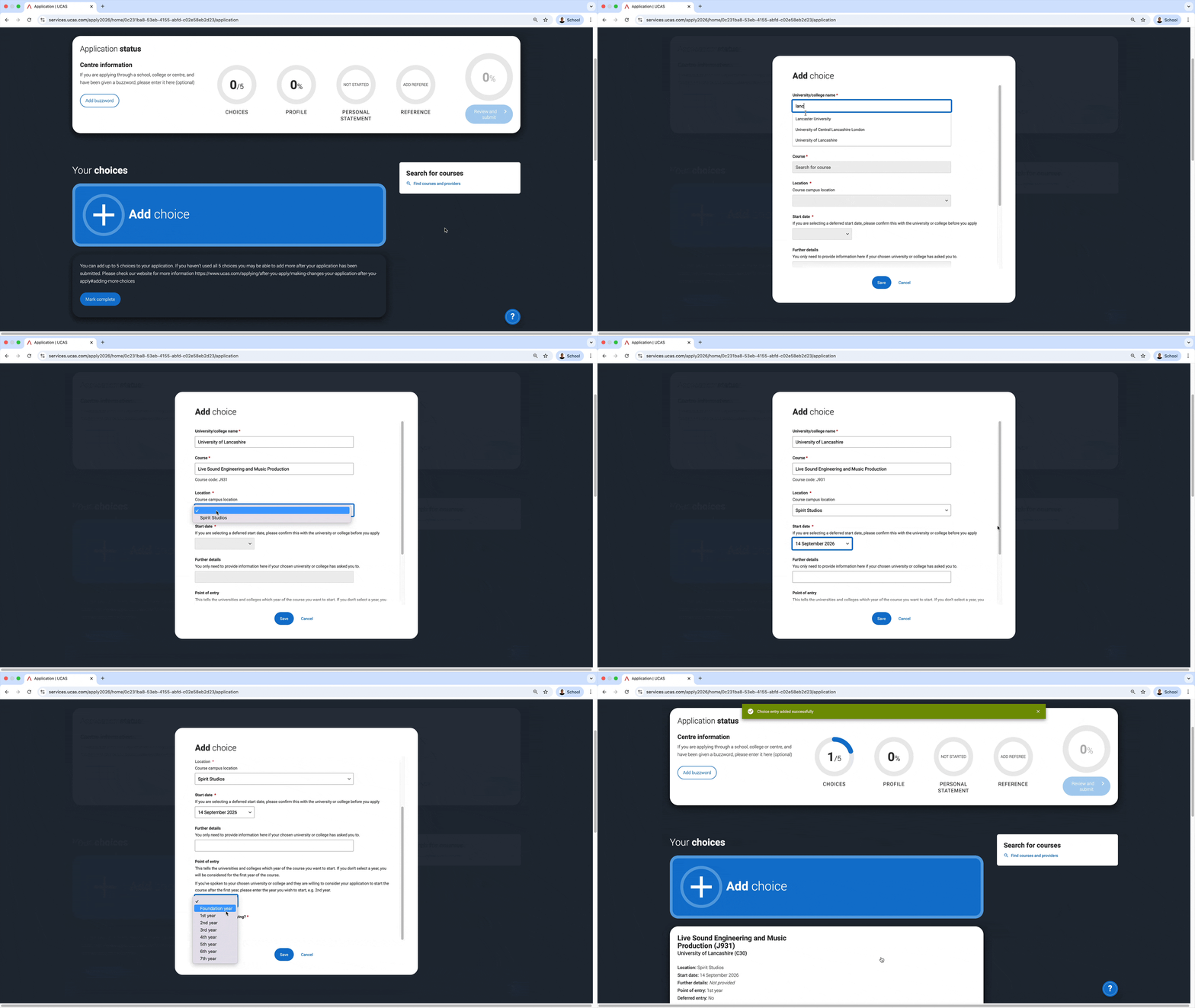
- From your application, click the blue ‘Add Choice’ button. You’ll then be greeted with a pop-up box with a number fields to complete
- Under University/college name, select ‘University of Lancashire’. Rather than typing the whole name manually, you can just start typing ‘Lancashire’ for it to create a shortlist to speed things up
- Under Course, start typing the name of the course and then select it. It will appear as: Live Sound Engineering and Music Production J931
- Under Location, select ‘Spirit Studios’
- Under Start date, select the date at which you want to start the course
- You can leave the Further details section blank
- Select the year of the course you want to start under ‘Point of entry’. Most applicants will select ‘1st Year’. Contact us before applying if you are planning a later point of entry.
- Select whether you’ll be living at home while studying or not
- Click Save. You’ve now added a course as a choice to your application. Repeat the above for any other courses you wish to add to your application
Demo of adding BSc (Hons) Live Sound Engineering and Music Production as a choice:
UCAS application deadlines and important dates for 2026 entry
- 2 September 2025 - Completed undergraduate applications for 2026 entry can be submitted to UCAS.
- 14 January 2026 - UCAS 'equal consideration' application deadline for most undergraduate courses for 2026 entry.
- 26 February 2026 - UCAS Extra opens for 2026 entry.
- 6 May 2026 - If you receive all decisions by 31 March, reply by 6 May, otherwise your application will be declined by default. (Except for those in Extra).
- 3 June 2026 - If you receive all decisions by 13 May, reply by 3 June, otherwise your application will be declined by default. (Except for those in Extra).
- 30 June 2026 - Undergraduate applications received after 30 June are automatically entered into Clearing.
- 1 July 2026 - Last date to add an Extra choice in your application.
- 2 July 2026 - Clearing opens for eligible applicants, and courses are displayed in UCAS' search tool.
- 22 July 2026 - If you receive all decisions by 15 July, reply by 22 July, otherwise your application will be declined by defualt, including those in Extra.
- 24 September 2025 - Final date for 2026 entry applications.
- 19 October 2026 - Last date to add 2026 entry Clearing choices
Need help?

Need help?
Our friendly admissions team is here to answer any questions you may have.
0161 276 2100 OR Contact usYou may also be interested in...

Accommodation
With a huge variety of accommodation options available to you, it couldn’t be easier to make Manchester your home.
Find out more

Admissions FAQs
Applying for a course can be a complicated process – below are a collection of our most frequently asked questions. If you still have questions after reading this page, please get in touch with our Admissions Team.
Find out more